
Nano Banana Vision
Advanced AI image editing technology. Load a photo, enter a prompt to change backgrounds, outfits, or blend scenes — all stunningly real.
AI Image Generator
Output
Ready for instant generation
Enter your prompt and unleash the power

What is Nano Banana
Nano Banana is a revolutionary AI image editing model that transforms photos using natural language prompts. The most powerful image editing model with exceptional consistency.
Natural Language Editing
Edit images with simple text prompts. Nano Banana's AI understands complex instructions like GPT for images.Character Consistency
Maintain perfect character details across all edits. The model excels at preserving facial features and identity.Scene Preservation
Nano Banana seamlessly blends edits with original backgrounds — precise lighting, color, and texture matching for professional, natural results.Style Transfer
Instantly switch to anime, oil painting, or cyberpunk — eye-catching style transfer while keeping character identity consistent.Pose Transfer
Change pose or action with a simple prompt — sit, jump, turn — precise pose transfer with clean edges and natural limbs.

Why Choose Nano Banana
Experience the most advanced AI image editing with unmatched consistency and quality.
One-Click Editing
Achieve perfect results in a single attempt. Nano Banana effortlessly solves the challenge of one-click AI image editing.Multi-Image Support
Process multiple images simultaneously. Supports advanced AI image editing workflows.AI UGC Creation
Create consistent AI influencers and user-generated content. Perfect for social media and marketing campaigns.High-Speed Processing
Experience near-instant results with processing times as low as 1–2 seconds, enabling rapid creative iterations.Advanced Style Transfer
Seamlessly apply artistic styles, colors, or textures from one image to another, enhancing creative flexibility.
Creativity in Motion
Explore style transfer, pose transfer, and seamless scene fusion with Nano Banana — pro-quality results in seconds
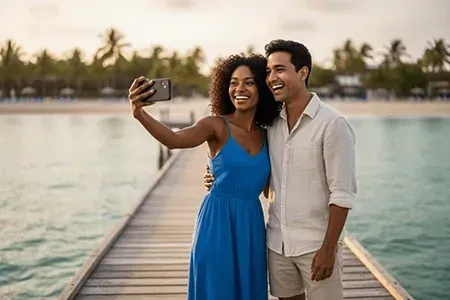
Golden Hour Portrait
Studio‑quality lighting, natural skin tones, and soft bokeh — created in seconds with Nano Banana. Subtle highlight rolloff and color accuracy preserve realism, while background separation and lens‑like depth make portraits ready for social or print.
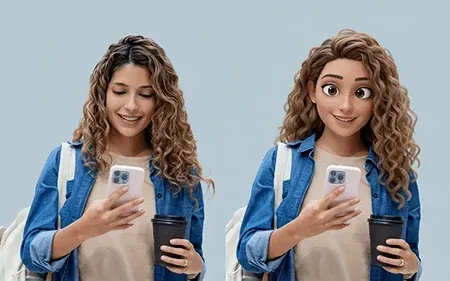
Artistic Style Transfer
Apply film, watercolor, or cyberpunk styles with Nano Banana while keeping character details and scene coherence. Control grain, palette, and texture without distorting faces, delivering stylized yet believable results for concept art and content.
Golden Hour Portrait
Studio‑quality lighting, natural skin tones, and soft bokeh — created in seconds with Nano Banana. Subtle highlight rolloff and color accuracy preserve realism, while background separation and lens‑like depth make portraits ready for social or print.
Artistic Style Transfer
Apply film, watercolor, or cyberpunk styles with Nano Banana while keeping character details and scene coherence. Control grain, palette, and texture without distorting faces, delivering stylized yet believable results for concept art and content.
Golden Hour Portrait
Studio‑quality lighting, natural skin tones, and soft bokeh — created in seconds with Nano Banana. Subtle highlight rolloff and color accuracy preserve realism, while background separation and lens‑like depth make portraits ready for social or print.
Artistic Style Transfer
Apply film, watercolor, or cyberpunk styles with Nano Banana while keeping character details and scene coherence. Control grain, palette, and texture without distorting faces, delivering stylized yet believable results for concept art and content.
Golden Hour Portrait
Studio‑quality lighting, natural skin tones, and soft bokeh — created in seconds with Nano Banana. Subtle highlight rolloff and color accuracy preserve realism, while background separation and lens‑like depth make portraits ready for social or print.
Artistic Style Transfer
Apply film, watercolor, or cyberpunk styles with Nano Banana while keeping character details and scene coherence. Control grain, palette, and texture without distorting faces, delivering stylized yet believable results for concept art and content.
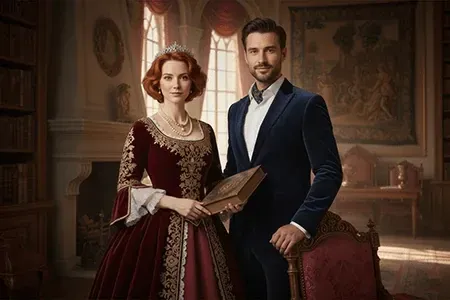
Royal Character Consistency
Nano Banana ensures face details remain identical across outfits and scenes while preserving identity and expression. Achieve consistent eyes, skin texture, and hair across batches — ideal for campaigns, series, and brand characters.
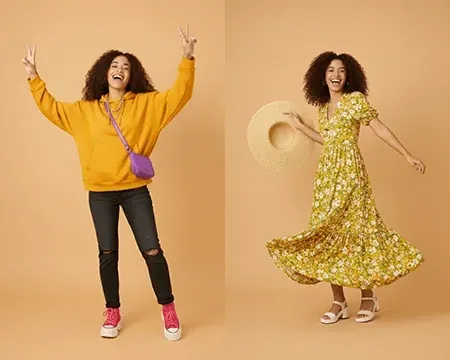
Pose Transfer Series
Nano Banana enables batch editing of multiple images with synchronized pose transfer and consistent character appearance across all edits.
Royal Character Consistency
Nano Banana ensures face details remain identical across outfits and scenes while preserving identity and expression. Achieve consistent eyes, skin texture, and hair across batches — ideal for campaigns, series, and brand characters.
Pose Transfer Series
Nano Banana enables batch editing of multiple images with synchronized pose transfer and consistent character appearance across all edits.
Royal Character Consistency
Nano Banana ensures face details remain identical across outfits and scenes while preserving identity and expression. Achieve consistent eyes, skin texture, and hair across batches — ideal for campaigns, series, and brand characters.
Pose Transfer Series
Nano Banana enables batch editing of multiple images with synchronized pose transfer and consistent character appearance across all edits.
Royal Character Consistency
Nano Banana ensures face details remain identical across outfits and scenes while preserving identity and expression. Achieve consistent eyes, skin texture, and hair across batches — ideal for campaigns, series, and brand characters.
Pose Transfer Series
Nano Banana enables batch editing of multiple images with synchronized pose transfer and consistent character appearance across all edits.
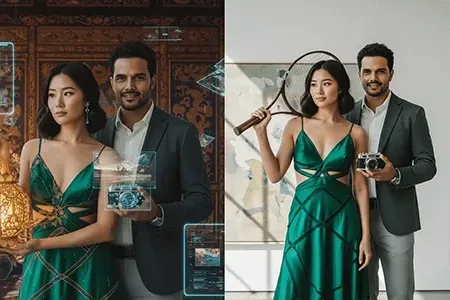
Scene Transformation
Nano Banana seamlessly blends the subject into a new interior while matching lighting, shadows, and perspective for a natural look.
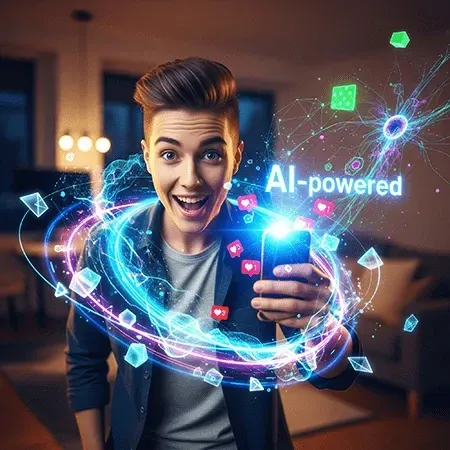
AI UGC Campaign
Generate on‑brand influencer content and social posts with Nano Banana — fast iteration for marketing workflows.
Scene Transformation
Nano Banana seamlessly blends the subject into a new interior while matching lighting, shadows, and perspective for a natural look.
AI UGC Campaign
Generate on‑brand influencer content and social posts with Nano Banana — fast iteration for marketing workflows.
Scene Transformation
Nano Banana seamlessly blends the subject into a new interior while matching lighting, shadows, and perspective for a natural look.
AI UGC Campaign
Generate on‑brand influencer content and social posts with Nano Banana — fast iteration for marketing workflows.
Scene Transformation
Nano Banana seamlessly blends the subject into a new interior while matching lighting, shadows, and perspective for a natural look.
AI UGC Campaign
Generate on‑brand influencer content and social posts with Nano Banana — fast iteration for marketing workflows.
Trusted Worldwide, Built for Scale
Creators and teams rely on Nano Banana every day — fast, reliable, and production‑ready.
People reached
10M+
Since launch
Images edited
200M+
All-time
Avg edit time
~0.8s
Per image
What Users Say About Nano Banana
Hear from creators and professionals who transformed their workflow with Nano Banana.
Maya Chen
E‑commerce Art Director
With Nano Banana, batch style transfer keeps skin tones and product colors consistent across campaigns. Turnaround dropped from days to hours.
Liam Rodriguez
Mobile Photographer
Pose transfer used to break arms or edges elsewhere. Here it stays clean and natural, and most edits render in ~0.8s.
Sofia Ivanova
Social Media Manager
With Nano Banana, UGC creation is finally predictable — identity stays identical across outfits and scenes, which saves us hours of retouching.
Arjun Mehta
Indie Game Producer
Nano Banana's scene fusion matches lighting and perspective so well that concept shots read as in‑engine captures — great for prototypes.
Hannah Müller
Beauty Brand Founder
Character consistency across hundreds of shots is the killer feature. Nano Banana's multi‑image editing keeps our look perfectly on brand.
Takeshi Sato
Creative Technologist
Natural‑language edits plus affordable per‑image pricing (~$0.039) make rapid iteration feasible for every team member.
Maya Chen
E‑commerce Art Director
With Nano Banana, batch style transfer keeps skin tones and product colors consistent across campaigns. Turnaround dropped from days to hours.
Liam Rodriguez
Mobile Photographer
Pose transfer used to break arms or edges elsewhere. Here it stays clean and natural, and most edits render in ~0.8s.
Sofia Ivanova
Social Media Manager
With Nano Banana, UGC creation is finally predictable — identity stays identical across outfits and scenes, which saves us hours of retouching.
Arjun Mehta
Indie Game Producer
Nano Banana's scene fusion matches lighting and perspective so well that concept shots read as in‑engine captures — great for prototypes.
Hannah Müller
Beauty Brand Founder
Character consistency across hundreds of shots is the killer feature. Nano Banana's multi‑image editing keeps our look perfectly on brand.
Takeshi Sato
Creative Technologist
Natural‑language edits plus affordable per‑image pricing (~$0.039) make rapid iteration feasible for every team member.
Nano Banana FAQ
Quick answers for AI image editing with Nano Banana to help you get results faster.
What is Nano Banana?
Nano Banana is an AI image editor that transforms a single photo with natural‑language prompts. It focuses on character consistency, scene fusion, and one‑click editing for production‑ready results.
How is it different from other tools?
Nano Banana delivers identical faces across outfits and scenes, matches lighting/perspective with original backgrounds, supports multi‑image context and batch workflows, and renders fast (~0.8–2s) with clean edges on hands and hair.
How does it work?
Upload an image, describe the change in natural language, and generate. Nano Banana analyzes subject, lighting, and perspective to deliver one‑click AI image editing that preserves identity and blends with the scene; typical results render in ~0.8–2s. Multi‑image context and batch mode are available for series.
What edits can I make?
With Nano Banana, perform face completion, background change, outfit swap, object insertion, pose transfer, style transfer (film, watercolor, cyberpunk), color grading, and scene fusion — while preserving identity.
How do I write effective prompts?
Be specific about subject, action, style, and lighting for Nano Banana AI image editing; add constraints like "keep identity" or "match background lighting"; avoid conflicting requests; start simple then refine.
How do I keep the same identity across images?
Use clear reference photos, avoid heavy occlusion and extreme angles, keep eyes visible, and reuse the same prompt tokens in Nano Banana. For series, enable multi‑image context or run a batch with shared settings.
Can I batch edit multiple images?
Yes. In Nano Banana, use batch mode to apply the same prompt to many photos or to generate a pose‑transfer series with synchronized identity and outfit.
What file formats and resolution are supported?
Nano Banana supports uploading common formats like JPG/PNG; download JPG/PNG (and WebP on Pro and above). High‑resolution output is supported; very large inputs may be downscaled for speed and stability.
Can I use the images commercially?
Yes, for most use cases. Ensure you own rights to the uploaded content edited with Nano Banana and avoid infringing trademarks or likeness rights. See Terms of Service for details.
Is my data private?
We respect your privacy and secure your content on Nano Banana. Uploaded images are used only to provide the service. You can delete your data at any time; see the Privacy Policy for specifics.
Results look off — how can I fix them?
In Nano Banana AI image editing, simplify the prompt, use a sharper input, ensure the face isn’t occluded, reduce conflicting styles, try a neutral background, or re‑run once — minor randomness can improve results.
What are Nano Banana's key advantages?
Nano Banana excels at character consistency, seamless scene fusion, one‑click AI image editing, fast rendering (~0.8–2s), multi‑image and batch workflows, and production‑ready outputs with clean edges and accurate lighting/perspective.
Does it work for product photography?
Nano Banana is great for ecommerce AI image editing: maintain color accuracy, consistent shadows, and clean backgrounds across catalogs and campaigns.
Best practices for pose transfer?
In Nano Banana, start with clear full‑body inputs, avoid motion blur, keep limbs visible, and describe pose in simple terms (e.g., "turn left 30°"). Enable multi‑image context for series.
How to control style intensity?
Add modifiers like "subtle", "gentle grain", or "light color grade". In Nano Banana AI image editing, reduce conflicting styles and prefer one dominant style per run.
Keep background coherence with the subject?
Mention scene cues (time of day, light direction, lens feel) and add "match lighting and perspective". Nano Banana aligns shadows, tone, and depth for natural AI image editing.
Can I prompt in languages other than English?
Yes, many languages work in Nano Banana. For critical AI image editing tasks or edge cases, English prompts may yield more predictable results.
How can I get support if I encounter issues?
If you need help with Nano Banana or AI image editing workflows, contact our support team by email and explore our step‑by‑step docs and tutorials. We typically respond within 24 hours and focus on resolving your issue quickly.
Transform Your Images with Nano Banana Vision
Start editing with the most advanced AI image editing model.